by developer | Feb 5, 2026 | AI & Prompting, PoliticQ
LLM Prompt compaction: If you need a HUGE number of API calls to power your business, experiment with prompt compaction. I developed a compaction prompt that reduced my tokens and total cost by almost 50%. Follow me on LinkedIn to get regular updates.
linkedin.com/in/donatodiorio
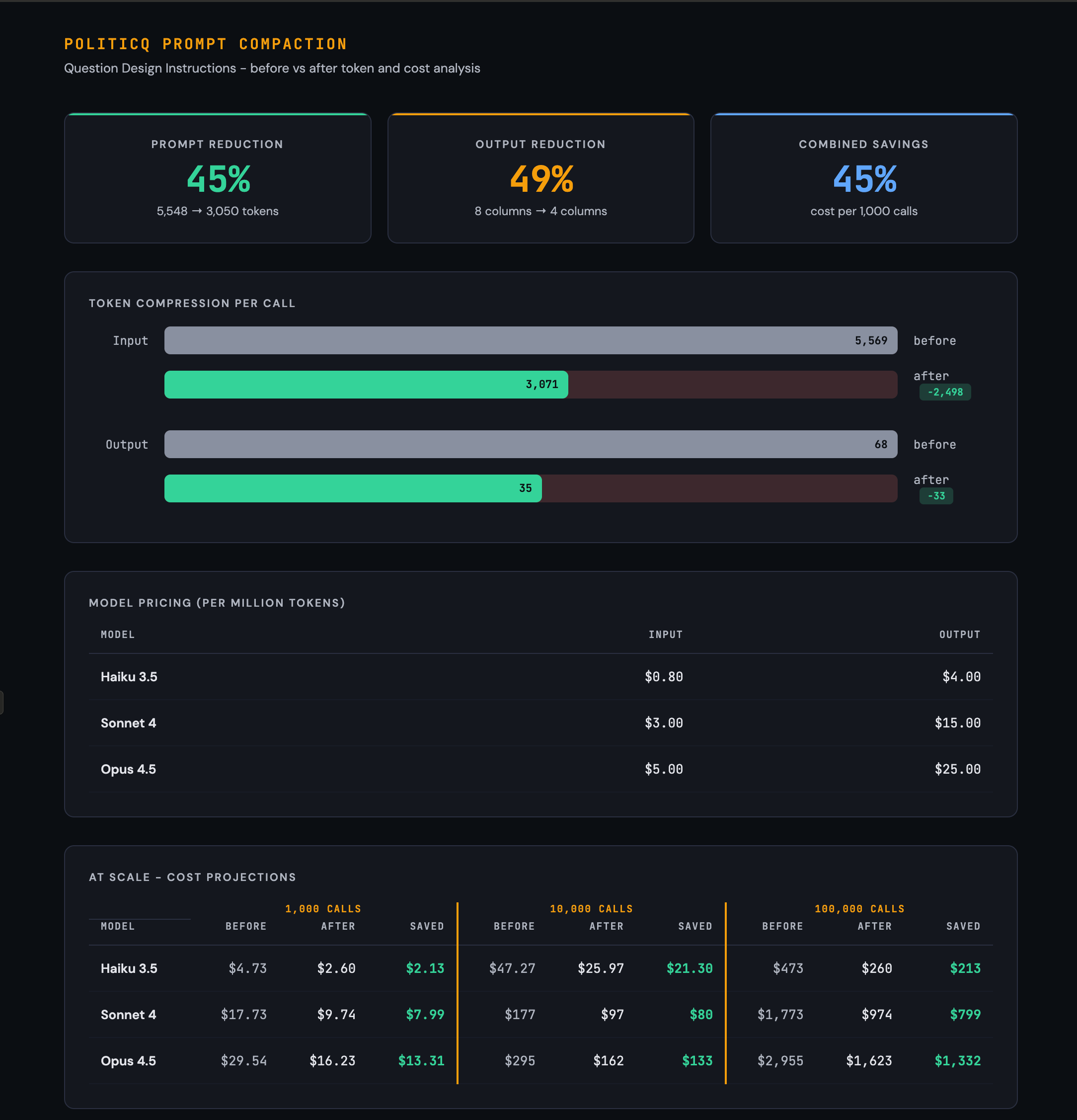
A universal meta-prompt that reduces any LLM system prompt by 40-50% without changing what it does. Only how it says it.
If you run batch LLM workloads, your system prompt rides along on every single API call. A 5,000-token prompt processed 100,000 times is 500 million input tokens. At Claude Sonnet’s pricing, that is roughly $1,500 in prompt overhead alone.
Cutting that prompt by 45% saves $675. Same outputs, same behavior, less money.
The Prompt Compactor is a meta-prompt you feed to any capable LLM. You give it your working prompt plus a sample input, and it returns a compacted version, a change log, output field analysis, and a validation report proving the compacted version produces identical results.
How It Works
You paste the meta-prompt below into any LLM conversation. Then you append two things: your working prompt and 1-3 sample inputs. The LLM applies eight compaction rules in priority order, analyzes your output fields for unnecessary columns, and validates the result against your sample.
The Eight Compaction Rules
Rules are ordered by typical savings. The first three alone usually deliver 50-60% of the total reduction.
1. Kill redundant examples ~20-25%
If a rule has 3+ examples, keep the 1-2 that best illustrate the edge case. Delete examples that merely confirm the obvious. If two examples teach the same lesson, delete one.
2. Tables to inline ~15-20%
Convert markdown tables to compact inline notation. A 5-row table becomes a single line. Example: instead of a 4-column table, write Format: ID » Output » Style » Notes
3. Tighten prose ~15%
Delete filler phrases: “It is important to note that”, “Please make sure to”, “You should always”, “In order to”. Rewrite “The output should be formatted as” to “Output format:”. Prefer imperative verbs: “Remove X” not “You should remove X”.
4. Compress checklists ~10%
If the prompt restates rules in a checklist/summary that already appeared in the body, delete the checklist. Rules exist once; do not repeat them.
5. Collapse whitespace ~8%
Remove blank lines between rules. Remove horizontal dividers. Single-space everything. One blank line maximum between major sections.
6. Compact headers ~5%
Replace verbose headers with short codes. ## RULE 7: Stem Distribution becomes R7: Stem Distribution.
7. Strip decoration ~3%
Remove bold markers (models do not need them to weight importance). Remove unnecessary markdown formatting. Keep italic or underline only if the prompt uses them as output markup.
8. Offload computation ~2%
If the prompt contains formulas or calculations that could be handled by code, flag them with [OFFLOAD] and remove. The caller can compute these client-side.
Output Field Analysis
Most prompts ask the model to echo back data the caller already has. The compactor evaluates every output field:
KEEPPrimary deliverable, required join key, or only the model can produce it
DROPCaller already has the data, value derivable from a kept field, or computable client-side
Built-in Validation
Compaction is useless if it changes behavior. The meta-prompt includes a validation step that catches drift before you ship:
1. Run the original prompt against your sample input. Note the output.
2. Run the compacted prompt against the same input. Note the output.
3. Compare field by field. Report any differences in behavior, formatting, content, or tone.
4. If differences exist, fix and re-validate until outputs match.
What You Get Back
The compactor returns four deliverables:
1 Compacted Prompt — ready to use, no commentary inside it.
2 Change Log — every change grouped by rule number with estimated token savings.
3 Output Changes — keep/drop analysis for each output field with the new format spec.
4 Validation Report — field-by-field diff proving original and compacted produce identical output.
Safety Rails
The compactor has hard constraints to prevent breaking your prompt:
Never delete a behavioral rule, constraint, or edge-case instruction.
Never merge two distinct rules into one if they govern different behaviors.
Preserve all examples that illustrate non-obvious edge cases.
Preserve the prompt’s exact output format delimiters (tabs, pipes, JSON keys).
Skip sections already under 50 tokens.
No meta-commentary added to the compacted prompt.
The Meta-Prompt
Copy everything inside the box below. Paste it into any capable LLM. Replace the two bracketed placeholders at the bottom with your prompt and sample input.
# Prompt Compactor Compact the prompt I provide below to reduce token count while preserving all behavioral instructions. Target 40-50% token reduction. Do not change what the prompt does. Change only how it says it. ## Compaction Rules (apply in order) 1. Kill redundant examples (~20-25% of savings) If a rule has 3+ examples, keep the 1-2 that best illustrate the edge case. Delete examples that merely confirm the obvious. If two examples teach the same lesson, delete one. 2. Tables to inline (~15-20% of savings) Convert markdown tables to compact inline notation. A 5-row table becomes a single line or short list. Example: instead of a 4-column table, write Format: ID | Output | Style | Notes 3. Tighten prose (~15% of savings) Delete filler phrases: “It is important to note that”, “Please make sure to”, “You should always”, “In order to”, “Keep in mind that”, “Note that”, “Be sure to”. Rewrite “The output should be formatted as” to “Output format:”. Rewrite “When you encounter a situation where” to “If”. Prefer imperative verbs: “Remove X” not “You should remove X”. 4. Compress checklists (~10% of savings) If the prompt restates rules in a checklist/summary section that already appeared in the body, delete the checklist. The rules exist once; do not repeat them. 5. Collapse whitespace (~8% of savings) Remove blank lines between rules. Remove horizontal rule dividers (—). Single-space everything. One blank line maximum between major sections. 6. Compact headers (~5% of savings) Replace verbose headers with short codes. ## RULE 7: Stem Distribution becomes R7: Stem Distribution. Drop markdown heading markers (##) unless hierarchy is essential for the model to parse sections. 7. Strip decoration (~3% of savings) Remove ** bold markers (models do not need them to weight importance). Remove unnecessary markdown formatting. Keep *italic* or _underline_ only if the prompt explicitly uses them as output markup. 8. Offload computation (~2% of savings) If the prompt contains formulas, scoring rubrics, or calculations that could be handled by calling code instead of the LLM, flag them with [OFFLOAD] and remove. The caller can compute these client-side. ## Output Compaction After compacting the prompt instructions, also analyze the output format: For every column/field the prompt asks the model to return, evaluate: – KEEP if: the field is the primary deliverable, a required join key, or only the model can produce it – DROP if: the caller already has the data (e.g., echoing back the input), the value can be derived from another kept field, or the value can be computed client-side List your keep/drop decisions with one-line justifications, then rewrite the output format spec with only the kept fields. ## Validation The prompt below includes a SAMPLE INPUT after the prompt text. Use this sample to QA the compaction: 1. Run the ORIGINAL prompt against the sample input. Note the expected output. 2. Run the COMPACTED prompt against the same sample input. Note the expected output. 3. Compare the two outputs field by field. Report any differences in behavior, formatting, content, tone, or missing/added elements. 4. If differences exist, fix the compacted prompt and re-validate until the outputs match. If no sample input is provided, select a representative test case yourself based on the prompt’s domain and run the same comparison. ## Deliverables Return four things: 1. COMPACTED PROMPT – The full rewritten prompt, ready to use. No commentary inside it. 2. CHANGE LOG – A numbered list of every change made, grouped by rule number (1-8), with estimated token savings per change. 3. OUTPUT CHANGES – The keep/drop analysis for each output field, with the new output format. 4. VALIDATION REPORT – Show the sample input, the expected output from the original prompt, the expected output from the compacted prompt, and a field-by-field diff. State PASS if outputs match or list each discrepancy and the fix applied. ## Constraints – Never delete a behavioral rule, constraint, or edge-case instruction. Compress wording only. – Never merge two distinct rules into one if they govern different behaviors. – Preserve all examples that illustrate non-obvious edge cases. – Preserve the prompt’s exact output format delimiters (tabs, pipes, JSON keys, etc.). – If a section is already compact (under 50 tokens), skip it. – Do not add explanatory text to the compacted prompt. No meta-commentary. — ## PROMPT TO COMPACT: [Paste your prompt here] ## SAMPLE INPUT: [Paste 1-3 representative inputs the prompt would process. These are used for validation only and will not appear in the compacted prompt.]
When to Use It
The sweet spot is prompts between 3,000 and 10,000 tokens. Below 3,000, the savings are real but small in absolute terms. Above 10,000, you will likely want to do a manual pass first to remove structural bloat before running the compactor.
The meta-prompt itself is about 490 tokens, so it pays for itself on the first call if your original prompt exceeds roughly 1,000 tokens.